Today
2 rounds · Scales & arpeggios, Bach Partita No. 2
Practice logged, piece by piece
A session usually covers more than one thing: warm-up scales, then a movement or two. Log each piece as a round inside the session with a focus score, and the app shows how much attention each piece has really been getting.
Scales, then the concerto — several pieces in one session, each with its own score.
Also called a practice journal, practice tracker or violin practice log.
One entry can hold several rounds — each piece with its own values — and the stats break them out separately.
| Variable | Type | Stats shown |
|---|---|---|
| Piece | Text · tracked individually | Own stats per value |
| Focus · /10 | Number | Average |
| Timer | Built in | Total time, per entry duration |
| Location | Built in | Pin or place, shown on the log map |
| Notes, photos, sketches, voice memos | Built in | Attached to any entry |
A real screenshot, not a mockup: the stats up top, a breakdown per piece, the streak and the calendar heatmap, with the entries below. Every number comes from the entries you add.
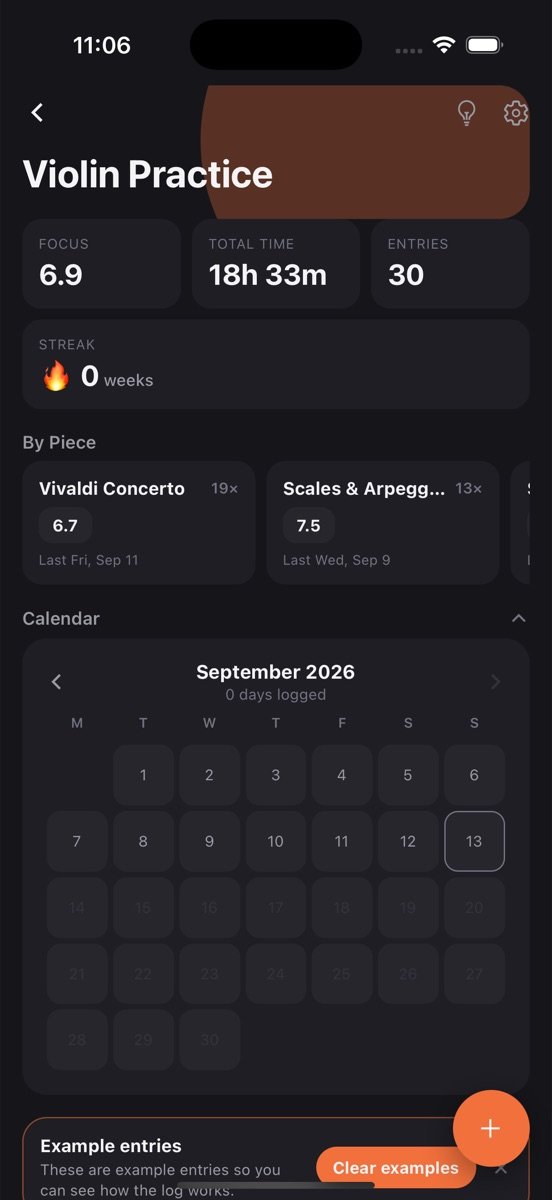
The log is created with the variables above and a few example entries so you can see how it works. Clear them with one tap.
Tap plus, fill in what you have, save. Timer, location, notes and photos are there when you want them, hidden when you don’t.
Average focus sits on the log card, with the rest one tap away. Set a goal if you want a nudge.
Mark "Piece" as tracked individually and you get a breakdown: how often you practised each piece, your average focus on it, and when you last touched it.
Four sessions a week, reminder on Monday, Wednesday and Friday at 18:30. The progress bar on the overview keeps you honest.
Attach a voice memo to a session. Listening back a month later is the most motivating progress chart there is.
The Violin Practice log is one log among many you can keep. Every one of them gets the same tools.
Tap the bulb on Violin Practice and get a plain-language read of your trends, what changed recently, and a suggested next goal, built only from your own entries.
Set a target like three times a week, watch the rolling progress bar, keep a streak, and get a reminder at the time you actually log. The app learns that time from you.
Every log has its own month view showing which days you logged. Gaps are obvious, consistency is visible, and one tap opens that day's entries.
One entry can hold a round per piece, each with its own values, and the stats break them out separately.
Attach a photo, draw a quick sketch, or record a voice note on any entry. They stay with that entry and come back on every device you sign in on.
Drop a pin or search for the place. Each log has a map view of everywhere you logged, and saved places open directly in Google Maps.
Find an entry by title, note or value across every log, filter by date or location, and jump straight to it.
Entries save on your phone first and sync when you sign in. No account needed to start, no feed, no one else sees your data.
Students preparing for exams or lessons who need to show their teacher what they worked on, adult learners squeezing practice into busy weeks, and anyone who has noticed that “I practised a lot this week” is rarely true when checked.
It is instrument-agnostic. Piano, guitar, voice, drums: the pieces and the focus score are the same idea.
The per-piece breakdown is usually a surprise. The piece you think you are working on hardest often turns out to be the one you touch least, because it is the hardest. Seeing that in numbers is what changes the next week's practice.
The goal and reminder handle consistency. Four sessions a week, even short ones, beats one long Sunday session, and the progress bar makes the difference visible.
Streaks reward perfection and punish one missed day. A rate per week rewards showing up. How the rolling goal works and how to set one you will keep.
6 min readWhen to keep one log with a grouping variable, when to split into several, and how tags and rounds fit. Examples for workouts, books, plants and symptoms.
Yes. Nothing is violin-specific. Rename the log, keep "Piece" and "Focus", or swap in "Tempo" or "Bars learned" as variables.
Sharing a log with another person is on the roadmap. Today the log is yours only, but you can show the per-piece stats screen in a lesson.
Yes. Start the timer and save. Entries with only a duration still count towards your weekly goal.
Free to start. Your logs stay on your phone until you sign in, then they back up and sync.