Yesterday
Easy loop
6.2 km Distance · 142 bpm Heart rate
Your runs, recorded and left alone
Log a run after you finish: distance, time from the timer, heart rate if you watch it, and a pin where you started. The app keeps weekly distance, the longest run and average heart rate, and stays out of the way. No feed, no kudos, no segments.
Distance, time, heart rate, where you started. No leaderboard.
Also called a run tracker, running diary or running journal.
One entry per session, with the timer and location always available. Add or rename variables any time in log settings.
| Variable | Type | Stats shown |
|---|---|---|
| Distance · km | Number | Sum, Avg per week, Max |
| Heart rate · bpm | Number | Average |
| Timer | Built in | Total time, per entry duration |
| Location | Built in | Pin or place, shown on the log map |
| Notes, photos, sketches, voice memos | Built in | Attached to any entry |
A real screenshot, not a mockup: the stats up top, the streak and the calendar heatmap, with the entries below. Every number comes from the entries you add.
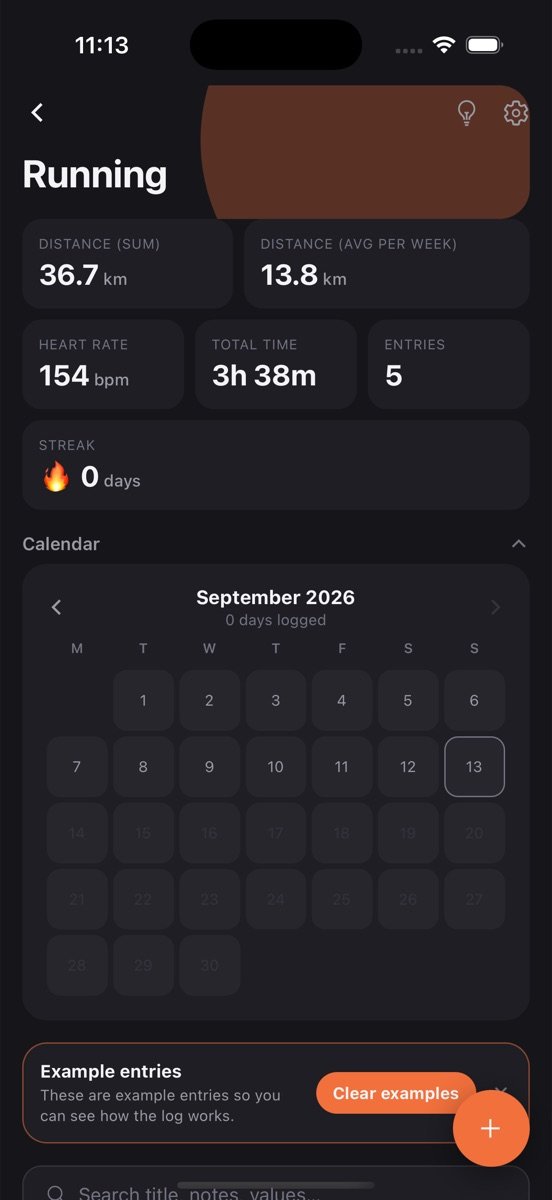
The log is created with the variables above and a few example entries so you can see how it works. Clear them with one tap.
Tap plus, fill in what you have, save. Timer, location, notes and photos are there when you want them, hidden when you don’t.
Sum distance sits on the log card, with the rest one tap away. Set a goal if you want a nudge.
The per-week rate and the goal show whether you ran three times, not whether you hit a “training load”. That is enough for most runners to stay consistent.
Start the timer when you set off, stop it at the door, drop the pin. No GPS drain, no waiting for satellites in the courtyard.
How the legs felt, what the weather did, which shoes. The notes are the training diary coaches wish runners kept.
The Running log is one log among many you can keep. Every one of them gets the same tools.
Tap the bulb on Running and get a plain-language read of your trends, what changed recently, and a suggested next goal, built only from your own entries.
Set a target like three times a week, watch the rolling progress bar, keep a streak, and get a reminder at the time you actually log. The app learns that time from you.
Every log has its own month view showing which days you logged. Gaps are obvious, consistency is visible, and one tap opens that day's entries.
Every exercise in a workout, every piece in a practice session: logged together in one entry, broken out automatically in the stats.
Attach a photo, draw a quick sketch, or record a voice note on any entry. They stay with that entry and come back on every device you sign in on.
Drop a pin or search for the place. Each log has a map view of everywhere you logged, and saved places open directly in Google Maps.
Find an entry by title, note or value across every log, filter by date or location, and jump straight to it.
Entries save on your phone first and sync when you sign in. No account needed to start, no feed, no one else sees your data.
Runners tired of platforms that turn every jog into a competition, beginners who just want to see the weekly distance creep up, and people coming back from injury who need a calm record of what they did.
It is also a good fit for treadmill runners, whose runs never show up properly in GPS-based apps.
Weekly distance is the number that predicts both fitness and injury, and it is the first stat on the card. The longest run shows progress toward a race distance. Average heart rate over easy runs, tracked for a few months, is a quiet fitness test.
Because every run has a place, the map ends up as a record of the routes you actually use, which is usually fewer than you think.
No. It saves the start location and the distance you enter. If you want a traced route, use your watch for that and keep this as the log.
Not yet. Type the distance and heart rate from the watch summary; it takes fifteen seconds.
Not as its own stat yet. Distance and duration are both recorded, so pace is one division away, and a computed pace stat is on the wish list.
Free to start. Your logs stay on your phone until you sign in, then they back up and sync.