Fri 11 Sept
Blue Hole Reef
38 m Depth · 24 °C Water Temp
A dive log that fits in your pocket
Skip the paper logbook. Log each dive in ten seconds with depth, water temperature and how long you were down, drop a pin on the dive site, and let the app keep your max depth, averages and dives-per-week up to date.
Depth, water temp, bottom time and the site — one entry per dive.
Also called a dive logbook, scuba log or dive journal.
One entry per session, with the timer and location always available. Add or rename variables any time in log settings.
| Variable | Type | Stats shown |
|---|---|---|
| Depth · m | Number | Max, Average, Avg per week |
| Water Temp · °C | Number | Average, Min |
| Timer | Built in | Total time, per entry duration |
| Location | Built in | Pin or place, shown on the log map |
| Notes, photos, sketches, voice memos | Built in | Attached to any entry |
A real screenshot, not a mockup: the stats up top, the streak and the calendar heatmap, with the entries below. Every number comes from the entries you add.
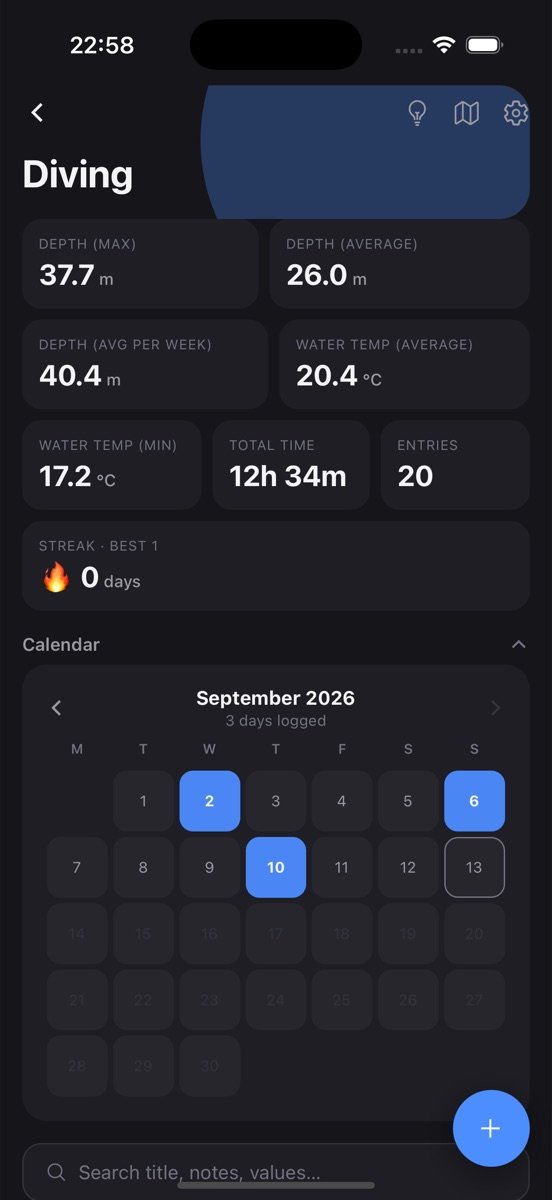
The log is created with the variables above and a few example entries so you can see how it works. Clear them with one tap.
Tap plus, fill in what you have, save. Timer, location, notes and photos are there when you want them, hidden when you don’t.
Max depth sits on the log card, with the rest one tap away. Set a goal if you want a nudge.
Every dive can carry a location. Open the map view to see every site you have dived, and tap a pin to jump back to that dive.
Start the built-in timer when you descend and stop it when you surface. Total time underwater adds up automatically across all your dives.
Attach a photo of the reef, a sketch of the site layout, or a quick voice note on the boat while the details are still fresh.
The Diving log is one log among many you can keep. Every one of them gets the same tools.
Tap the bulb on Diving and get a plain-language read of your trends, what changed recently, and a suggested next goal, built only from your own entries.
Set a target like three times a week, watch the rolling progress bar, keep a streak, and get a reminder at the time you actually log. The app learns that time from you.
Every log has its own month view showing which days you logged. Gaps are obvious, consistency is visible, and one tap opens that day's entries.
Every exercise in a workout, every piece in a practice session: logged together in one entry, broken out automatically in the stats.
Attach a photo, draw a quick sketch, or record a voice note on any entry. They stay with that entry and come back on every device you sign in on.
Drop a pin or search for the place. Each log has a map view of everywhere you logged, and saved places open directly in Google Maps.
Find an entry by title, note or value across every log, filter by date or location, and jump straight to it.
Entries save on your phone first and sync when you sign in. No account needed to start, no feed, no one else sees your data.
Recreational divers who want their history in one place without carrying a paper book on every trip, instructors who log dozens of dives a month, and anyone working toward a certification that counts logged dives. It suits the diver who wants the numbers and the map, not a social feed.
If you dive a few times a year, the app makes sure the details survive between trips. If you dive every week, the per-week rate and total bottom time become the numbers you actually care about.
After a couple of months the stats stop being trivia. Your average depth shows what kind of diving you actually do versus what you plan. The minimum water temperature tells you when to switch to the thicker suit. Total bottom time is the number your next course will ask for.
Because every dive can carry a location, the map view becomes a personal atlas: the sites you keep returning to, the ones you meant to go back to, and the gaps on the coast you have never dived.
Yes. Entries are saved on your phone first and sync to your account once you are back online, so logging on a boat works fine.
For your own records, yes. If your training agency requires signed paper logs, keep those too — the app makes it easy to copy the numbers across.
Yes. A log can have any variables you like. Add "Air used" in bar or "Visibility" in metres in log settings and every new dive will ask for it.
Free to start. Your logs stay on your phone until you sign in, then they back up and sync.